How to get cheap mobile data with an eSIM
When travelling outside Europe, you have probably noticed how expensive the roaming data offered by our mobile operators can be. For the United States, for example, Vodafone Czech Republic charged an astonishing CZK 7.70 per megabyte.
Wi-Fi Calling is a good option for conventional calls and text messages. Once enabled, calls and messages are made and received over the internet whenever you are connected to Wi-Fi. The operator name changes from the roaming partner to something such as Vodafone CZ Wi-Fi. These services are then charged as if you were on your home network.

If you do not want to rely on Wi-Fi Calling alone, the usual solution is to buy a local SIM card with much better prices.
When your phone supports eSIM, it is even easier. You can buy an eSIM for your destination online before leaving home and activate it after arriving.
An eSIM from Airalo
On my most recent trip, I used an eSIM from Airalo. It is a small company offering genuinely cheap data. A week in the United States with a 1GB allowance cost $3, less than one hundredth the cost of Vodafone’s roaming data.
For comparison, Airalo charged $13 for 4GB valid for 30 days across Europe, which was actually a better offer than anything from a Czech mobile operator. Perhaps the eSIM would even have made sense for domestic use.
Other companies exist, of course. Stork Mobile offered 1GB for 15 days in North America for $12.99, while GigSky charged $20.
Buying and installing it
You can buy an Airalo eSIM through its website or mobile app and pay by card or PayPal.
Using the code IGOR8868 gives you a $3 discount.
After the purchase, you receive an email containing the necessary details and a QR code for adding the eSIM to your phone. This is slightly impractical if you have only a phone and no other device from whose screen you can scan the code. In that case, you have to enter the details manually.
Unlike the GigSky app, Airalo’s iOS app did not support adding the eSIM directly. You had to use the QR code or enter the details manually.
You add the eSIM to your phone only once. If the package expires or runs out of data, or you travel to a different destination, you simply buy another package through your account.
The eSIM can be bought and added to the phone at home; just turn it off afterwards. It activates only when you enable it and first connect to the internet at your destination.
Using the eSIM
Correct configuration is essential. Airalo’s eSIM contains data only: it does not provide a phone number and cannot make calls or send text messages.
The best configuration at your destination is therefore to set it as the primary source for mobile data, enable data roaming on it and completely disable mobile data for your home SIM.
You can check your current data usage by signing in to your account on the website or in the mobile app.
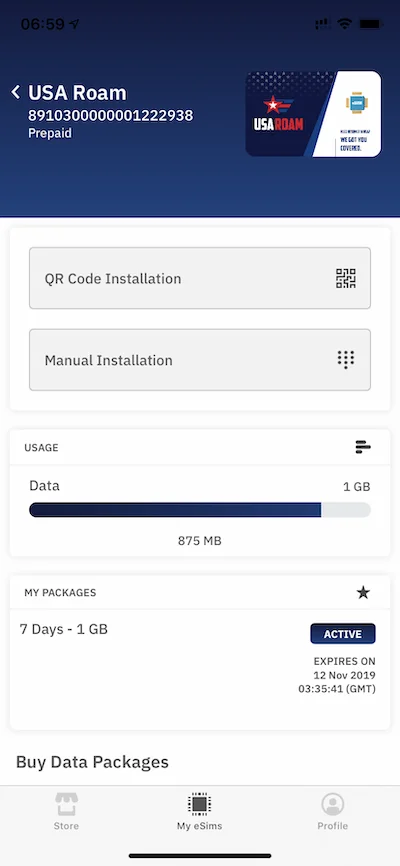
You receive no warning when the package expires; the internet connection simply stops working. Unused data does not carry over to a new package.
Summary
An eSIM is a useful technology that can save a considerable amount of money on mobile data while travelling. I was happy with Airalo during two weeks of use and encountered no problems.